
Table of Contents
- Executive Summary
- Preface: Why We Need Good Policy and Good Implementation of Public Paid Family and Medical Leave programs
- Research Process
- Key Learnings
- Learnings Part 1: Communicating Effectively about PFML
- Learnings Part 2: Outreach
- Learnings Part 3: Applications, Processing, and Delivery
- Learnings Part 4: IT Infrastructure and Culture
- Conclusion
- Additional Resources
Learnings Part 4: IT Infrastructure and Culture
4.1 Empower a Single Product Manager
4.2 Ruthlessly Prioritize User-facing Issues
4.3 Ship Iteratively, Even (and Especially) when Transitioning from Legacy Systems
4.4 Beware of Unproven Commercial-off-the-shelf (COTS) Products that are Not Well Suited to the Program
Many of the recommendations in the previous section require a robust and dynamic partnership with a modern IT department committed to iterative development and human-centered design. To paraphrase Tolstoy, to a meaningful degree, each happy IT setup is alike, and every broken IT setup is broken in its own way. However, we can offer a couple of words about key principles to keep in mind. Most of the material here is explicated at greater length, in, e.g., the U.S. Digital Service Playbook, which program leaders would be well advised to consult.
4.1. Empower a Single Product Manager
It is critical that program leadership empower a single product manager to oversee IT development, who can ensure that program priorities are indeed taking precedence in the IT shop.
Note that a product manager is not exactly the same as a project manager, though the roles can be filled by the same person. A project manager keeps track of day-to-day workloads and ensures work is proceeding apace. A product manager considers the full functionality of the system, ensures it is meeting the needs of users, and that it prioritizes enhancements according to the needs of the program. The product manager is aware of what IT is working on, but is intimately aware of the program’s needs.
In the absence of a product manager, prioritization in the face of competing workstreams becomes increasingly difficult, with the program often unable to quickly address important issues. Conversely, the IT shop may sink significant amounts of time and money into functionality that is not on the critical path, or in fact entirely unnecessary.
The additional resources needed to hire for this one position can pay meaningful dividends in better targeting all IT spending across the program.
4.2. Ruthlessly Prioritize User-facing Issues
Relatedly, in resource-limited state governments, there are inevitably more IT issues than the IT shop can fix. Again, especially given the sensitivity of PFML beneficiaries to time delays and red tape in the program, preference must be given to issues that directly impact end users. Note that empowering a single product manager who can determine priorities with some authority of program knowledge helps make this possible.
A small example from New Jersey illustrates the point. As of fall 2019, a bug in the NJDOL password reset system for certain TDI/FLI applications asked users to provide the answers to their security questions without actually displaying the questions:
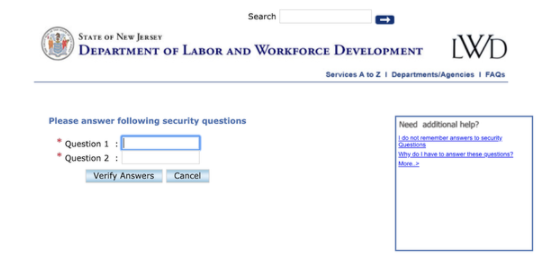
This bug was known for at least two years—and yet remained unresolved. Such issues erode beneficiaries’ faith in the system (not to mention, in this instance, causing significant increases in call center backlogs and concomitant delays in claim processing), and the IT side of the house must have a way of prioritizing them.
This recommendation, admittedly, may have implications for legislators as well, insofar as some technological enhancements are mandated by legislation. Legislators should be careful to consider the IT team’s capacity when ordering such changes. If legislatively mandated changes fill the team’s hours, and the mandates come with no further IT resources, then the legislation may have the unintended effect of deprioritizing critical user-facing issues that the program leadership simply no longer has the flexibility to address.
4.3. Ship Iteratively, Even (and Especially) when Transitioning from Legacy Systems
It is old hat by now but still worth reiterating that the best IT development is iterative and modular—that is, rather than lay out a comprehensive plan up front and deliver an entire system in one go, tech teams should build small and operable pieces of functionality, collecting feedback and making corrections as they go, and delivering the overall system piece by proven piece.1 Program offices resort to the older monolithic approach (known as waterfall development) at their own peril—and this is true even (in fact especially) when, like New Jersey, states face the daunting prospect of transitioning away from outdated legacy systems. As hard as it is to replace only portions of an old and limitedly interoperable system, it is harder still to delay critical improvements for years while a new system is developed, and expect that everything will continue to function when flipping the switch suddenly, all at once.
Every system is different, but the following proposal that we developed for the TDI/FLI program leadership team about how it might think about transitioning iteratively away from a single legacy mainframe system may be instructive to other jurisdictions with similar legacy technology:
- Replace the web application. The new web application writes to a new database, which will, for the time being, push to the old one. (This write functionality, in New Jersey’s case, already existed.)
- Replace the payments process with a new direct deposit module. For now, it takes data from the old system, but can be rerouted to take data from the new system. (In New Jersey’s case, the payment system was already external to the core system, so the export ability already existed.)
- Build out internal processing, and then claim status check, for web apps submitted via the new system. Records are still pushed to the old system for payments. Mail applications continue to be processed on the old system.
- Move paper applications to the new system; continue pushing data to the old system.
- Move direct deposits to the new system; continue pushing data to the old system.
- Move mail processing to the new system; continue pushing data to the old system.
- Move reporting to the new system and retire the old system.
4.4. Beware of Unproven Commercial-off-the-shelf (COTS) Products that are Not Well Suited to the Program
Choosing whether to build or buy is one of the single biggest choices a program will make. See, for example, this article from federal digital service agency 18F about the tradeoffs.
PFML programs should explore all options in choosing to build or buy their IT—and commercial-off-the-shelf (COTS) products are a very appealing option when they fit the use case. But program leadership should think carefully about to what degree the COTS products they find actually do meet their programs’ requirements. State PFML programs, although not exceedingly complex, are rather unlike analogous programs from the private sector—and while vendors will make the case that their software is eminently customizable to the PFML use case, program leaders should be clear-eyed about how close COTS products really get them to their goals. A COTS product that has never been successfully implemented for an organization (or, better yet, government agency) with a nearly identical use case should be treated skeptically and thoroughly interrogated.
Program leadership should also think critically about the impact of COTS products down the line, not just in initial set-up. Program requirements will inevitably evolve over time, and COTS products can prove very difficult to continue amending over time. The extra $1M or extra six months a custom solution may require up front will likely pay for itself many times over during ongoing sustainment. States struggling to transition from monolithic, hard-to-modify legacy systems should consider whether they are willing to risk simply replacing one unwieldy monolith with another.
Citations
- For more on agile vs waterfall development, see 18F’s guide to agile development: source